

Wait… Chrome? The web browser?
Bring up Chrome in a conversation about professional video playback and you're likely to get a few raised eyebrows.
We're an industry that loves purpose-built technology: SDI routers, production switchers, Barco E2 and E3 processors, dedicated media servers, and LED processors with enough settings to qualify as a second career.
But what if one of the most sophisticated graphics platforms ever developed is something most of us already use every day?
Yes. The same Chrome you use to check email.
There's a serious engine under those tabs
Chrome is built on Chromium, a huge open-source project, with Blink handling much of the work of turning web content into what you see on screen.
Beyond webpages, modern browser technology offers GPU-accelerated graphics, hardware-assisted video decoding on supported systems, WebGL, WebGPU, animation, and real-time rendering tools.
That's an extraordinary amount of engineering behind something we mostly use to look at websites. The trick is knowing what that foundation can—and cannot—guarantee.
Actually, it's already in the show
Browser technologies are all over live experiences: trade-show touchscreens, kiosks, real-time dashboards, audience interaction, digital signage, and custom presentation interfaces.
But suggest using Chrome for a general session or a giant LED wall and suddenly someone asks, “Is that professional?”
Fair question. Although we've all seen very expensive professional hardware have a bad day.
Where Chrome makes sense
Breakouts: Presentations, graphics, videos, and simple interactive content are natural candidates for a well-designed browser application.
Trade-show exhibits: Touchscreens, product demos, live data, and interactive experiences play directly to the browser's strengths.
General sessions: It can be a practical option when the system is locked down, the media is tested, and the show doesn't demand capabilities the browser can't reliably provide.
Large-format LED: Modern GPUs and browsers can render substantial visual canvases. The questions become output resolution, synchronization, sustained performance, and how the entire system behaves under show conditions.
Screen size alone doesn't decide what's professional. The requirements do.
Where things get serious
Chrome wasn't designed specifically to run a live show where a single missed frame can matter.
Some productions need frame-accurate cueing, synchronized outputs, specialized codecs, precise transitions, timecode, and predictable recovery when something goes wrong.
Those aren't automatic browser features. And nobody wants a keynote interrupted by a notification—or the mouse pointer making an unscheduled appearance.
A production-ready setup means controlled versions, careful GPU and display configuration, a tested media path, monitoring, backups, and rehearsals. Pressing F11 isn't a commissioning procedure.
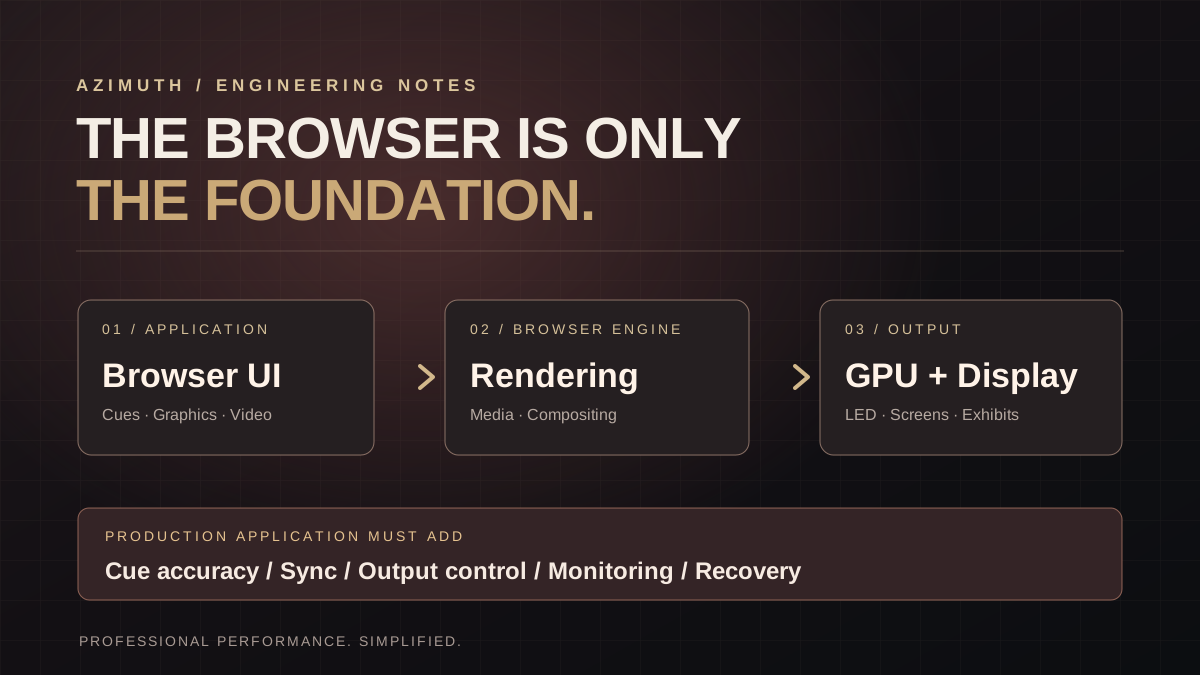
A browser is a foundation, not a media server
While developing Azimuth Player, we've been thinking about how much sophisticated technology already exists inside modern browsers.
Why reinvent rendering and interface systems when we can focus on the parts live production actually needs: cueing, media management, output control, and an interface designed for the operator?
The browser provides powerful building blocks. The application determines whether the result is ready for showtime.
That doesn't mean Chrome replaces every dedicated media server. It means we should be willing to question when one is really necessary.
Professional is about performance, not the label
Maybe we should spend less time asking whether Chrome is “professional enough” and more time asking whether a particular system meets the needs of the show.
If it delivers the correct picture, at the correct time, reliably and predictably, the audience doesn't care what's under the hood. Ideally, the operator doesn't have to either.
That's a big part of the thinking behind Azimuth Player.
Would you trust Chrome for a general session, an interactive exhibit, or a 40-foot LED wall? And where would you draw the line?
The Play Button Is the Easy Part.
Why a professional video engine is far more complex than pressing Play.
Read Blog #1 ↗Explore the playback software behind this discussion.
Explore Azimuth Player ↗